

What is a CRM sales pipeline?
A CRM sales pipeline shows specific sales opportunities through agreed stages: from a confirmed need, through a conversation and quote, to a won or lost deal. For each opportunity, you track the customer, responsible person, value, expected decision date and next step. The sales team knows where each deal stands and what needs to happen today.
Pipelines show individual jobs, while the sales funnel shows how many opportunities are going through the process and where the number is decreasing. CRM connects this view to leads and contacts, communication and offers.
Butiga's sales pipeline gives the team a shared answer to the question: where does every open deal stand, and what is happening next? A qualified lead becomes an opportunity linked to a company, owner, value and specific stage. Instead of manually combining spreadsheets and reports, the team works from the same overview of open, won and lost opportunities.
Lead is not the same as a sales opportunity.
A lead represents the company and contacts with whom you build a relationship. A sales opportunity is a specific potential deal. One company can have several opportunities, values and decisions over time. Separating these concepts keeps the customer history intact, while the pipeline shows only deals actively being managed.
- Sales pipelines and stages.
Organize opportunities through defined stages that match the way your team qualifies, presents, offers and closes the business. - The owner of the opportunity.
Every open job has a responsible person, so it's clear who needs to continue the conversation or update the situation. - Value and currency.
Enter the estimated value of the opportunity and the currency so that the overview of the open pipeline has a business sense. - Probability of closure.
Record an estimate at stage or opportunity level without presenting it as guaranteed revenue. - Expected date of decision.
Track the expected closing date and more easily identify opportunities without real progress. - History of phase change.
Butiga records transitions between stages, the person making the change and an explanation when entered.
View the pipeline according to the question you need to answer
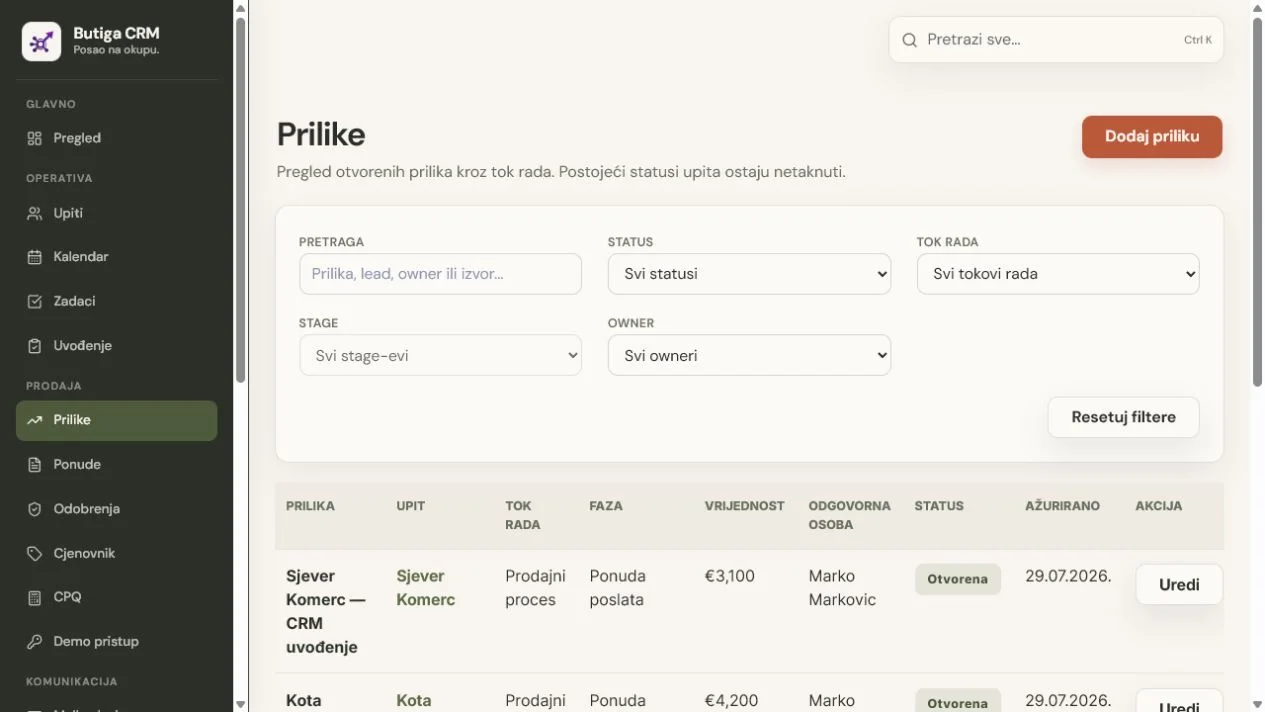
Search and filter opportunities by status, pipeline, stage and owner. This enables different working views: one salesperson's open opportunities, deals at the quote stage or opportunities awaiting a decision. The view makes team conversations more concrete without replacing them.
Illustrative example: from a qualified lead to a decision
- Lead is qualified. The team confirms that there is a specific need and opens up a sales opportunity related to the client.
- The opportunity enters the initial phase. Gets owner, estimated value, currency and source.
- After the conversation, it changes the phase. When the need and participants are confirmed, the opportunity goes to the next step, and change remains in history.
- The quote gains business context. The team shall record the expected date of the decision and update the closure assessment.
- The outcome is clearly recorded. The opportunity is marked as won or lost. In the event of a loss, the reason is kept instead of an indefinite disappearance from the table.
Note: This example shows how the product works. Names, values and statuses on the screen are for demonstration.
The decision is made through people, not just through stages.
An opportunity can be at a promising stage and still stall because the team does not know who decides, who internally supports the solution or who blocks it. Butiga's relationship map links contacts to specific opportunities and records their role, influence, relationship strength and attitude towards the proposal.
- A decision-maker and an internal advocate.
The team sees if the key persons are recognized and whether there is a contact that can help make the proposal progress within the customer organisation. - Influence and attitude.
A contact can be marked by influence and attitude towards the proposal, without reducing the entire company to one person. - Risks in relationships.
The overview highlights missing decision-makers, weak relationships with important participants or influential blockers needing attention. - A note with the participant.
A short context remains with the opportunity, so a colleague does not have to rediscover who participates and what matters to whom.
Important: The relationship map does not assess people on the salesperson's behalf. It organises verifiable information entered by the team and shows where the sales picture remains incomplete.
From phase to real next step
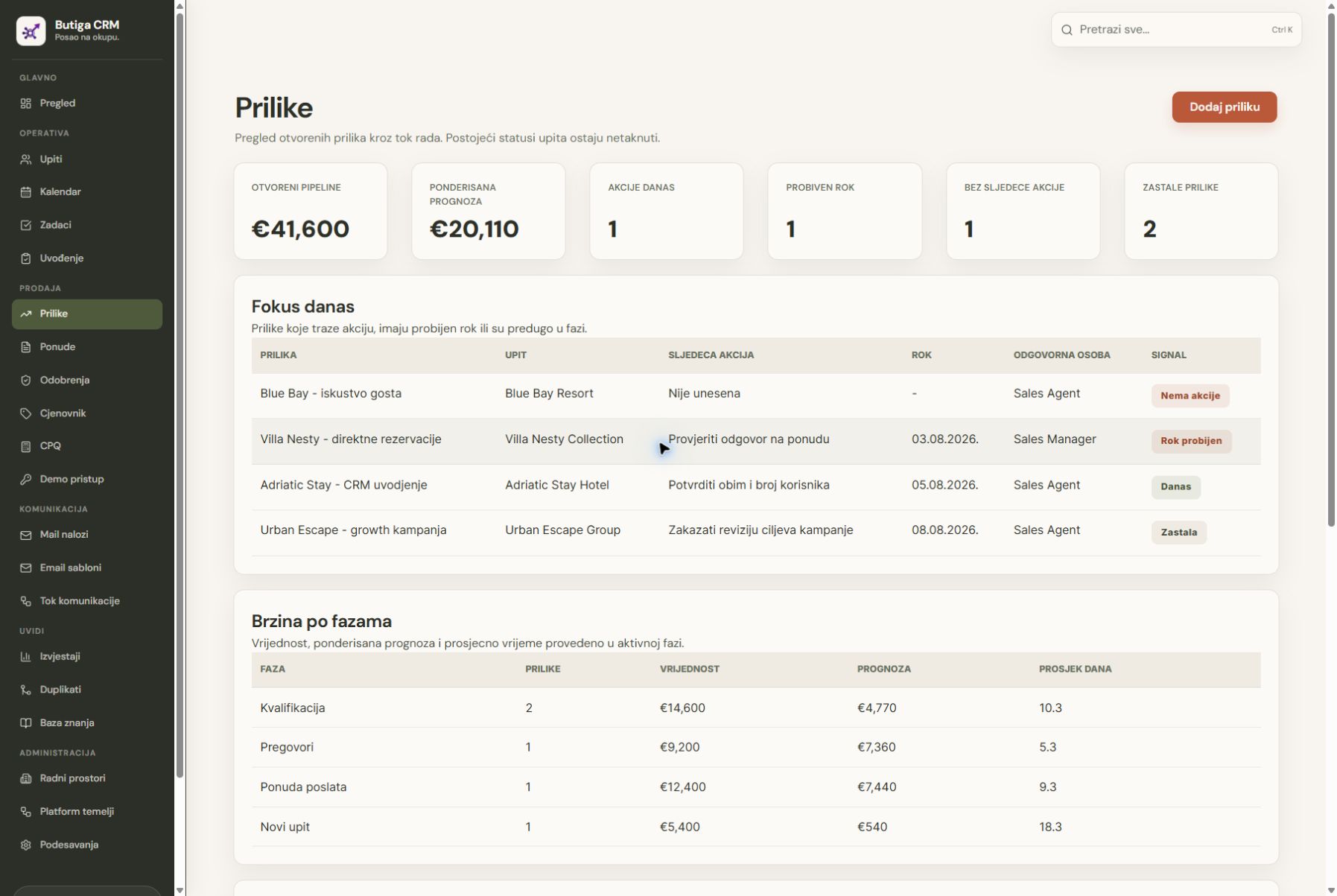
A pipeline is useful only when every open opportunity has a responsible person and a verifiable next action. Butiga connects the stage with the owner, next action and deadline, showing which opportunities are progressing, waiting for a reply or needing attention.
- Owner, action and deadline.
An open opportunity has a responsible person, a concrete next step and a date to react to. - The criteria for a phase change.
A stage changes after checking that the agreed conditions for the next step are met, rather than based only on a feeling. - Reminders when there's no answer.
When the tracking is on, Butiga recognizes that the answer has not arrived and at agreed intervals informs the owner in the web application and on the Android phone. - Health of sales opportunities.
The overview highlights opportunities without a next action, with overdue deadlines or without progress, so deals do not disappear into silence. - Weighted forecast.
Value and probability provide a more realistic view of expected revenue by currency, without promising a certain result.
How Butiga follows up on a quote without sending automatically
- The salesperson sends a quote or selected template. The message remains connected to the client and the sales opportunity.
- Butiga follows the answer and the deadline. If the answer comes, the active reminder stops so the team doesn't get any old warnings.
- If there's no answer, the owner gets a reminder. The notification appears in Butiga and, when mobile notifications are enabled, in the Android app.
- The seller decides what is being sent. Butiga does not send a follow-up message by itself. The user views the context, answers, defers the reminder or ends the activity.
- The manager sees risk and progress. Pipeline health and the weighted forecast show where action is needed and what is actually progressing.
Important: The reminder prompts user action; it does not replace their judgement or send an email without confirmation.
What a manager can check without another spreadsheet
- how many opportunities are open at each stage;
- who owns each potential deal;
- the estimated value and currency;
- where a decision is expected;
- which opportunities are won, lost or archived;
- How the opportunity moved through the stages and who changed the state.
Pipeline is not a forecast without context
The sum of open opportunities is not guaranteed revenue. Probability and expected decision dates help build a more realistic view, but the estimate is useful only when stages reflect actual conversations and evidence. Butiga provides the structure; forecast quality depends on a consistent process.
Who Butiga's sales pipeline is for
- Sales teams
with multiple opportunities and shared stages through which deals move. - Small B2B companies
wanting to replace manually coloured Excel rows with clear statuses and responsibility. - Service businesses
where decisions go through needs assessment, meeting, offer and deal. - Agencies and consultants
managing several proposals, values and expected decision dates in parallel.
When you do not yet need a pipeline
If you have only a few customers, the job ends in one conversation and there is no need for ownership, phases or value assessment, a simple list can be sufficient. Pipeline benefits most when open jobs last through multiple steps and require a consistent team review.
How to set up the stages that the team really uses
Good phases describe a verifiable event, not an undetermined feeling. “Initiated conversation” is clearer than “interested”. “The offer is sent” is clearer than “in progress”. At a demo presentation we go through your existing process and show how to turn it into a small number of understandable stages without inventing an additional administration.
See how to manage leads and contacts, how Email stays with the sales context or explore all Butiga featuresFor a demonstration of your workflow, book a demo.
How to set up a sales pipeline in CRM: six steps
- Choose one actual sales process. Take a deal that went from enquiry to decision and record the events that moved it forward. Introduce separate pipelines only when the way of working genuinely differs.
- Set up a small number of verifiable stages. For example: qualified opportunity, conversation held, quote sent and decision. “Won” and “lost” represent outcomes. Adapt the names and conditions to your team.
- Assign an owner and basic details. Every opportunity should have a company, contact, value and expected date of decision. Clear unknown information with your client; do not fill them with assumptions.
- Write down the next action and deadline. Replace “follow up with the customer” with a specific task: “Call the decision-maker on Thursday and check the quote scope”.
- Update the phase based on the event. A sent quote is not an accepted quote. Tie stage changes to what happened, rather than the salesperson's optimism.
- Introduce a weekly review. Review overdue deadlines, opportunities without a next action and reasons for losses. Every open deal should leave the review with a clear decision about what happens next.
For broader team preparation, read how to organise the sales processTo assess your current situation, use CRM tools and checklist for switching from Excel.
CRM sales pipeline for businesses in Montenegro
If you manage sales in Montenegro, a pipeline helps keep referrals, emails and conversations linked to a specific deal. Butiga's owner is Temelj za rast, with a registered address in Budva. Contact and Company Information are available before the presentation.
Podgorica: a B2B service sales example
Illustrative scenario: A consulting company in Podgorica prepares a quote for a business customer. After the initial conversation, it records the scope, decision-maker and next meeting date. When the quote is sent, the opportunity receives a new deadline for checking the decision. If the deadline changes, the owner updates the date and reason instead of leaving the deal “in progress” for months.
Budva: a supplier example before the tourist season
Illustrative scenario: A supplier in Budva negotiates a seasonal purchase with a hotel. The opportunity tracks the potential deal value, the customer's decision deadline and the person discussing the quote. A won deal is then handed to operations with the agreed scope and commitments. This is a sales process example, not a claim about a real customer or a replacement for a hotel reservation system.
See the application for small businesses and sales teamsAt a Butiga CRM demo you can go through the process of your firm from Podgorica, Budva or another city.
Frequently asked questions about sales pipelines
How many stages should a sales pipeline have?
As many different, verifiable steps as you have to make a decision. Start simply and add a phase only if it changes the action or the promotion criteria for the team. More columns alone do not mean better control.
Does pipeline value represent expected revenue?
The total value of open opportunities is not guaranteed revenue. A weighted estimate accounts for probability, while the decision date provides a timeframe. For example, a €2,000 opportunity with an estimated 40% probability has a weighted value of €800. The figures are illustrative; this estimate does not guarantee a sale either.
Can a sales pipeline initially be managed in Excel?
It can, while a small number of opportunities and a simple division of responsibilities allow it. CRM becomes more useful when more people need the same overview of communication, phases and deadlines. CRM and Excel for sales management before the decision.