

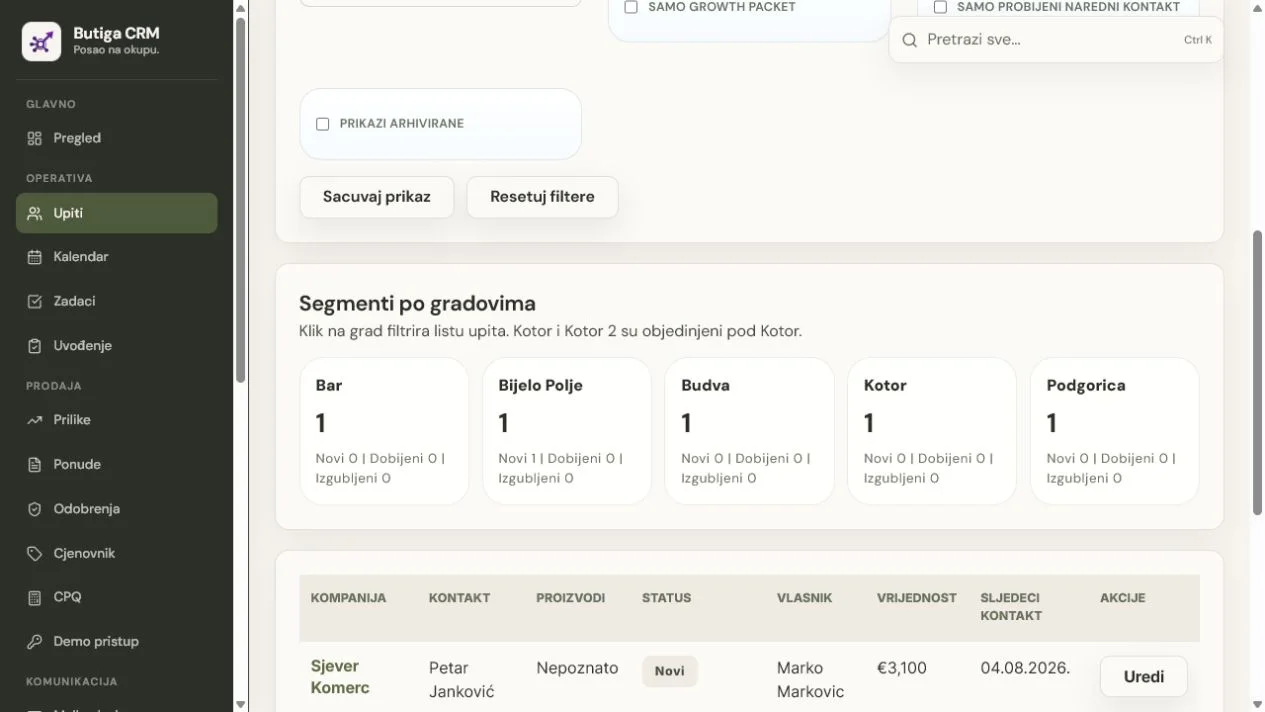
CRM instead of Excel makes sense when sales becomes more than a list of companies and phone numbers. Butiga connects contacts, owners, business email, activities, meetings, tasks, quotes, sales stages and the next deadline. You no longer need to write ever-longer comments in one cell or search for current information across multiple copies of the same spreadsheet.
When Excel's still good enough
Excel is useful for calculations, analysis, temporary lists and data one person edits occasionally. If you have few simple contacts, no handoff between colleagues, no versioned quotes and no follow-up dependent on reminders, switching to CRM may be unnecessary work.
Butiga does not try to replace every spreadsheet in the company. Budgets, one-off analyses and special calculations can stay in a spreadsheet. The difference arises when a row becomes an active customer relationship.
Signs that the sales table has become a bottleneck
- There are multiple versions of the file.
It is not clear whether the current table is from an email, a shared folder, or a copy of a colleague's computer. - The column “note” carries the entire history.
Calls, promises, prices and next steps end in a text that is difficult to search and check. - A deadline doesn't create an obligation.
A date in a cell does not automatically mean that the task has an owner or that the delay will become visible. - Email is separate from the record.
To understand the customer, you must open a spreadsheet, private inbox and quotes folder. - A status means different things to different people.
“Active”, “warm” or a coloured row lacks an agreed meaning or change history. - The report requires manual cleaning.
Before each meeting, someone fixes formulas, duplicates, filters and outdated estimates.
What really changes by switching to CRM
The biggest change is more than a better-looking table. Data gains relationships and responsibility. A lead has an owner. An opportunity has a stage and change history. The next contact has a date. A task has a person and status. A quote stays with the customer. Email and activities can be viewed in the same sales context.
Butiga can warn of potential duplicates using company or contact details, and authorised users can merge duplicates while retaining related records. Administrators and sales managers can export filtered leads to CSV for further work with the data.
Illustrative example: the same customer in Excel and Butiga
- In the table there is a row ‘Adria Servis’. The columns show the contact, the status of the offer and the date that has already passed.
- The salesperson looks for an explanation. The latest email is in a private inbox, the quote PDF in a folder and the meeting agreement in a cell comment.
- In Butiga, the customer gets one record. Contact, owner, status, estimated value and next contact become structured data.
- Communications and obligations are connecting. Email, note, meeting, task and offer remain with the same record.
- The opportunity enters the pipeline. The team sees the stage and responsible person, while history shows when the opportunity moved.
- The manager reviews exceptions. Overdue contacts and deals without a next action can be found without manually colouring rows.
Note: The customer name and data in this example are illustrative. The records and links described correspond to the actual Butiga workflow.
How to prepare the transition without bringing the old mess
- Separate active jobs from the archive. Start with open leads, active customers and quotes still awaiting a decision.
- Define the minimum fields. The company, main contact, owner, status, next step and date are often more useful than dozens of poorly filled columns.
- Remove obvious duplicates. Check the different names of the same company, repeated contacts and rows without usable data.
- Define the meaning of status. Translate old colors and internal abbreviations into a small number of stages that the team really uses.
- Agree on the transfer method. Active records can be entered or transferred after reviewing the data structure. Butiga does not promise universal automatic import of every arbitrary Excel spreadsheet.
- Save the source table as an archive. Do not delete it immediately. Restrict changes and use it for verification until the new process is reliable.
- Stop parallel record-keeping on an agreed date. If the new data is long entered into both the CRM and the table, the team gets two sources of truth again.
What should not be transferred automatically
- outdated leads without contact details or clear value;
- duplicates created by merging multiple lists;
- free notes that no one understands anymore;
- temporary formulae and ancillary columns without business significance;
- personal data for which you no longer have a legitimate purpose of storage;
- every historical row simply because it exists in a file.
Who moving to Butiga is for
- A small B2B business
which started with a table, and now more people are communicating with the same clients. - A sales team
who need ownership, pipeline and a verifiable follow-up. - A service business
needing to retain quotes and promised scope for later handoff alongside sales. - Owner of company
wanting a view of active deals without manually compiling reports.
When not to rush with migration
If you have not agreed on lead ownership, stage meanings and when the next step is mandatory, a new tool will only display the same ambiguity more neatly. Define the basic process first. Do not discontinue existing records until active data has been checked after transfer and the team knows where to record new information from then on.
Assess the transition using one real file
During the presentation, show an anonymised example of your sales spreadsheet structure: column names, typical statuses and how you record follow-up. Do not send real personal data before we agree on a secure review method. We will show how one row would become a customer record, opportunity, task and quote in Butiga.
See how these work: leads and contacts, the sales pipeline, business e-mail and quotes and price listIf you are a small business, also read CRM for small companiesTo assess your file and process book a demo.