

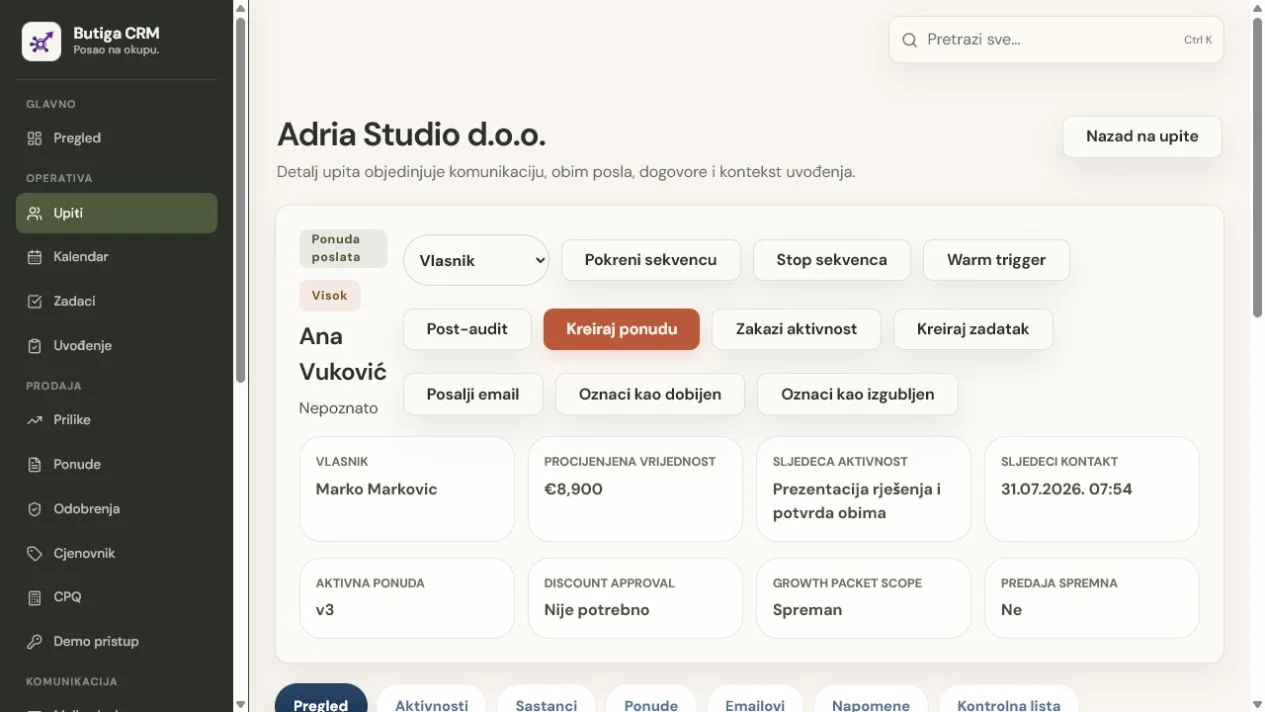
CRM is not automatically better than Excel. Excel is stronger for calculations, ad hoc models, flexible analysis and lists maintained occasionally by one person. Butiga makes sense when a row becomes an active customer relationship with an owner, email history, sales stage, next contact, task, quote and handoff to a colleague. The problem then is not the table format, but a sales process dependent on columns, colours, comments, private inboxes and manual discipline.
Short answer: choose for your process, not the screen format
- Choose Excel
if you make a budget, a model, a one-time analysis or a small list that one person can confidently maintain. - Choose Butiga
if the sales record must link the client, communication, owner, deadline, offer and next step. - Use both
if the CRM is running an operational sales process and Excel remains a tool for specific analyses and financial models. - Do not change the tool yet
if the team has not agreed on the stages, responsibilities and minimum data to be maintained regularly.
CRM vs Excel for real work
| Need | Excel | Butiga CRM | Practical Conclusion |
|---|---|---|---|
| Quick Start | The new table is ready in a few minutes and can follow almost any arbitrary structure. | Requires agreement on fields, stages, owners and permissions before routine use. | Excel wins for temporary records. CRM requires more preparation, but introduces consistency. |
| Calculations and models | Formulas, pivot tables, graphs and flexible modelling are the basic purpose of tools. | Reports on structured sales data, but does not replace every business calculation. | Excel is better for calculation and special analysis. |
| Simultaneous work | Microsoft 365 supports joint editing when the corresponding file format is on OneDrive or SharePoint. | Multiple users work on records within a workspace, according to roles and assigned permissions. | They both support teamwork; CRM adds business rules and relations between records. |
| Lead Owner | It can be a column, but meaning, allowed values and changes depend on the file construction. | The owner is a structured link to an authorised user and is used in reviews and responsibilities. | CRM is clearer when ownership starts work and it's not just information. |
| Email Context | It may contain an address, link or manually copied note, while the conversation naturally remains in the email system. | Supported business e-mail accounts, messages and attachments may remain connected to client and sales process. | CRM reduces searching between a row, private inbox and folder. |
| Follow-up and deadlines | Date, formula and conditional formatting may indicate a delay, but execution depends on the maintenance of the table. | The following contact, task or meeting shall have a date, owner, status and connection to the client or opportunity. | CRM is better when the deadline has to become someone's visible obligation. |
| Sales pipeline | Phases, values and probabilities can be modeled by columns, formulas and reports. | The opportunity has a phase, value, owner, history of changes and related activities. | Excel can display pipelines; CRM treats it as a daily workflow. |
| Offers and Versions | The data can be calculated in the table, but the document, approval and valid version require additional rules and files. | Price list items, quantities, discounts, approvals, versions and PDF stay within the sales workflow. | CRM is more appropriate when the price and the valid offer must remain controlled. |
| Work handover | The agreement can be transmitted through columns, comments and related documents to be interpreted by the team. | The accepted offer, volume, promises, owner and tasks can be transferred to the onboarding record. | CRM is better when operations needs the same context that sales promised. |
| Access rights | File sharing and cloud permissions control access; worksheet protection primarily prevents changes to locked cells. | Backend checks workspace, membership, role and right over requested record. | CRM gives a more precise model for different responsibilities within the same sales system. |
| Export and further processing | The data is already in the analysis tool, and PowerQuery can connect and shape external sources. | Authorised roles can export filtered leads to CSV for further work. | Excel remains a natural tool for deep analysis even after the introduction of CRM. |
When Excel is the better choice
Excel is better when the value is primarily in calculation and adaptability, not in the implementation of the agreed sales flow.
- one person maintains a small number of contacts and knows the whole context with confidence;
- the list is temporary, project or one-time research;
- complex calculations, scenarios, pivot analyses or special models are needed;
- the structure is often changed and it is not yet clear what will become a permanent process;
- there is no handoff between sales, managers and operations;
- offers, deadlines and communications are not often enough to justify a special system.
Microsoft Excel is also not necessarily an isolated desktop file. Current versions for Microsoft 365 can support common editing, display changes and version history when Microsoft conditions for format, subscription and cloud location are met.
When Butiga is the better choice
Butiga is better when the team needs a verifiable way of working from enquiry to handoff, beyond a shared list.
- multiple persons communicate with the same client or take over from a colleague;
- every active lead must have an owner and next step;
- e-mail, note, task, meeting and offer should remain with the same record;
- the pipeline phase must have an agreed meaning and a history of changes;
- the discount, version and approval of the offer must be controlled;
- operations must receive what sales actually agreed;
- access should depend on workspace, membership, roles and rights over the record;
- The manager needs a review of the exceptions without manual cleaning of multiple copies of files.
The most common healthy choice is CRM plus Excel
Introducing CRM does not mean banning spreadsheets. Butiga can be the operational source for customers, communication, quotes and commitments, while Excel remains useful for specific calculations, budgets and analyses. The boundary is simple: active sales status and next actions should have one agreed home.
Three common misconceptions about Excel
“Excel does not support multiple people working together”
This is incorrect for supported Microsoft 365 scenarios. Microsoft documents co-authoring in Excel, including simultaneous changes when the file is in the right format and stored on OneDrive or SharePoint. The difference goes beyond user counts. CRM predefines that a person owns a lead, a date is the next contact and a message belongs to the customer history.
“Excel worksheet protection is the same as CRM authorisation”
They are different. Microsoft explicitly states that worksheet protection is not intended as a security feature; it primarily prevents changes to locked cells. An Excel file may have additional protection and cloud sharing permissions. Butiga checks the workspace, membership, role and permission for the requested record in the backend. These are different models and should not be reduced to a “password” label.
‘Excel cannot merge data’
Power Query can. It connects external sources, transforms data, merges tables and refreshes results. This is a strong advantage for data preparation and reporting. Connecting sources, however, is not the same as a daily sales workflow where a customer has an owner, next step, email, quote and handoff.
Illustrative example: from Adria Servis to a completed process
- An active row exists in Excel. It contains the company, contact, assessment, status "offer" and date that passed.
- The team first determines the real state. The latest email is with the salesperson, the quote PDF is in a shared folder and the agreed deadline is in a cell comment.
- A customer record is created in Butiga. The company, contact, owner, status, estimated value and the next contact become structured fields.
- Communications and obligations are connecting. The supported business email, note, meeting and task remain with the same client context.
- The opportunity enters the pipeline. The team sees the stage, the owner and the next activity, and history records a phase change.
- The offer gets a controlled version. Items, quantities, discounts and approval lead to a PDF that stays linked to the opportunity.
- The agreement moves to operations. A locked version of the offer, volume and promises enter the onboarding record with the owner and tasks.
Important: Adria Servis and all data in the example are for demonstration. This is not a real customer case study or a claim of measured results.
How to move from Excel without carrying over the old mess
- Separate active records from the archive. Start with open leads, real customers and quotes still requiring a decision.
- Map the business meaning of the columns. “Contact”, “status” and “date” are insufficient until it is clear whether the date means the last call, quote expiry or next follow-up.
- Define the minimum record. Company, main contact, owner, phase, next step and date are often a better start than dozens of empty fields.
- Remove duplicates and obsolete data. Check the variants of names of the same company, repeated contacts and data for which you no longer have a valid purpose of storing.
- Translate the colors to the rules. Each phase needs a name, an input condition, an expected action and a clear moment of exit.
- Assign owners and permissions. Determine who sees, edits, approves and takes over a specific part of the process.
- Test a small active sample. Check one real workflow from lead to quote and handoff before a wider transfer.
- Save the source table as an archive. Limit changes, document the transition date and do not delete it before the transfer check.
- Stop the parallel entry. From the agreed date, new sales statuses and next actions have one home.
What should not be transferred automatically
- every historical row simply because it exists;
- temporary formulae and ancillary columns without business significance;
- free notes that no one understands anymore;
- duplicates resulting from the merger of multiple sales lists;
- obsolete contacts without a clear purpose and a basis for further storage;
- The colors and abbreviations that different people interpret differently.
Who does not need to move to Butiga immediately
Do not introduce CRM just because a spreadsheet looks untidy. If one person manages a few simple contacts, sales has no defined stages, the team is not ready to record next steps regularly or you mainly need complex calculations, Excel may be a better and less disruptive choice. A new tool does not resolve unclear responsibility by itself.
Sources and methodologies
Excel claims were verified on 29.07.2026 in official Microsoft documentation:
- Collaborate on Excel workbooks at the same time with co-authoring — conditions and modalities for joint editing;
- Protect a worksheet — the purpose and limits of worksheet protection;
- About Power Query in Excel — linking, transforming, connecting and updating data;
- Create and format tables — working with structured Excel tables.
Butiga claims were checked against the current implementation: structured leads and contacts, owners, statuses, activities, tasks, meetings, reminders, supported business email, quotes and price lists, pipelines, onboarding, access rights and CSV exports for authorised roles. We did not compare Microsoft prices or claim Butiga replaces Excel for general analysis.
Check your decision on one of your processes
See how Butiga replaces the sales tableThen check plans and pricing and our approach to securityAt a demo presentation you can bring an anonymised spreadsheet structure. We will show how an active row would become a customer, opportunity, task, quote and organised handoff.