

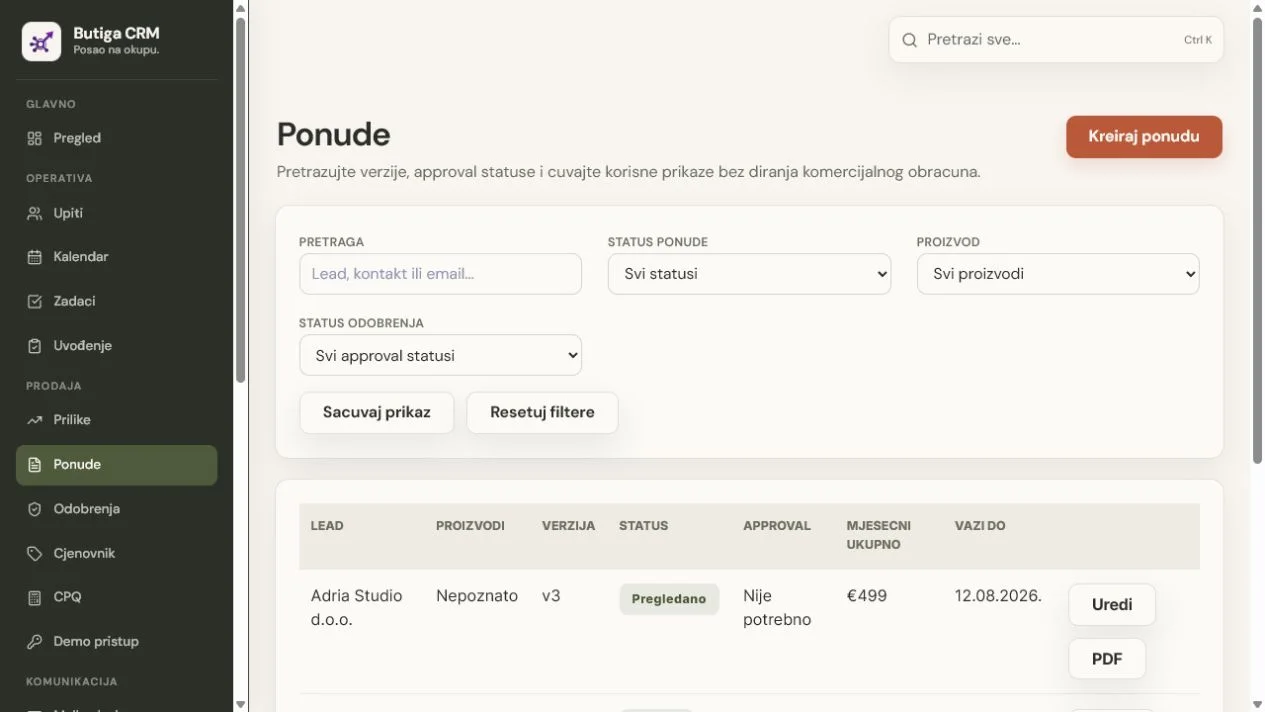
Quotes and price lists in Butiga help the team prepare commercial proposals from controlled data instead of the last Word or Excel file someone found. Each quote stays linked to a specific lead, with calculations, discounts, expiry dates, statuses, versions and PDF in the same sales context.
What gets lost when everyone prepares quotes from their own file
The problem goes beyond how the document looks. An old price can end up in a new quote. An agreed discount can lack an explanation. Sales and management may be looking at different versions while the customer has a third. When acceptance arrives, operations must then determine what was actually sold.
- Controlled price list items.
Plans and services have names, descriptions, prices, currencies, billing periods and other commercial parameters the team needs. - A quote linked to the customer.
Each offer begins with a concrete lead, so the document, value and decision do not remain separate from the sales conversation. - Clear calculations.
Butiga separates the base subtotal, one-off fees, promotional and manual discounts, and monthly and annual totals where applicable. - Discount control.
A discount exceeding the set threshold may wait for the approval of the responsible person before the offer continues. - Versions instead of rewriting.
When commercial terms change, a new version, the reason for the change and a snapshot of the data underlying the quote are retained. - PDF and expiration date.
The team can open PDF offers and immediately check by when the conditions apply.
The price list is the source; the quote is the agreement for a customer
The price list stores standard plans, prices, currencies and billing rules. A quote uses these details in the context of a specific customer. This separation matters: a future price change in the active price list should not silently overwrite commercial terms already sent to the customer.
Butiga therefore supports price list versions and retains a commercial snapshot with each quote. The snapshot records the data used when it was created, explaining how the amount was calculated and which version of the terms the customer received.
Illustrative example: a quote without guessing the price
- The salesperson opens a quote from the lead. The company and the sales context are already connected to the record.
- Selects items from a valid price list. The plan, currency, billing period and setup fee come from a controlled source.
- Enter commercial details. Adds expiration date, duration of contract, summary for client and other necessary conditions.
- The discount is checked. If it exceeds the set threshold, the quote waits for approval. The responsible person approves or rejects it with a reason.
- The quote gets a version and PDF. The customer receives a document based on the saved calculation, and the team knows which version was sent.
- The outcome is recorded. The status can track a draft, sent, viewed, accepted, rejected, expired or cancelled quote.
Note: This example shows how the product works. Company names, products, amounts and dates on the screen are for demonstration.
Buyer room: quote, attachments and decision in one place
For a sent quote, the salesperson can enable a controlled Buyer Room link. The buyer opens the valid quote version and its attachments without searching through a long email thread, while the team retains control of the link's expiry and availability.
- A time-bound link.
The room remains valid until its set deadline or the quote's expiry. The salesperson can revoke the link or issue a new one, invalidating the previous link. - A signal that an offer has been reviewed.
Butiga records view counts and the latest view, and notifies the responsible people that the buyer opened the quote. - A clear buyer decision.
When accepting or rejecting, the buyer confirms their name and email and adds a brief explanation for a rejection. - A review is not the same as an acceptance.
The opening is a sales signal. The status is changed to accepted or rejected only after specific confirmation of the decision.
What a manager can check without searching the inbox for a document
- which lead the quote belongs to and which products are included;
- which version of the offer is currently recorded;
- whether the offer is a draft, sent, reviewed, accepted, rejected, expired or cancelled;
- whether the discount is pending approval and who has made the decision;
- the base amount, fees, discounts and total value;
- when the quote expires and when it was last changed;
- which PDF and attachments belong to a specific quote;
- whether the buyer room is active, when it expires, how many times it was viewed and who confirmed the decision.
A quote version needs a reason
When a customer requests a different price, an extra service or a changed deadline, overwriting the existing quote erases important history. Butiga stores the version number, reason for change, author and commercial snapshot. You can return to the previous agreement without comparing filenames such as “final”, “final-2” and “really-final”.
Discount approval does not need to hold up every deal
A quote need not wait unnecessarily when its discount requires no special decision. When it exceeds the set threshold, the responsible person receives a clear decision to make and records the reason for approval or rejection. Thresholds and roles depend on your team's settings; we do not present one percentage as a universal rule.
Who quotes and price lists in Butiga are for
- B2B sales teams
who send more offers, they have more sellers, and they need to know which version is valid. - Service businesses
combining monthly services, one-off setup and special commercial terms. - Agencies and consultants
needing clear scope, expiry dates, discounts and negotiation history. - Teams with approvals
where a higher discount or a more complex commercial condition must be reviewed by the manager.
When a simple document is sufficient for you
If you send only a few quotes a year, prices rarely change, there are no multiple versions or approvals and one person manages the entire deal, a well-designed template may be enough. A controlled system brings the greatest benefit when several people use the same price list and changes must remain verifiable.
How to prepare price list before first offer
Start with a small number of real items your team sells today. For each, define a customer-friendly name, currency, billing method, what is included and when a one-off fee applies. Then decide who may change the price list and approve exceptions. During a demo, we follow this process using your existing price list, without promising that every billing model can be copied without adaptation.
See how the offer comes from a lead and contact record, how it fits in the sales pipeline or explore all Butiga features. For a demonstration of a specific calculation, book a demo.