

Lead in Butiga is not only the name of the company in the table. It is a work record that connects the company, one or more contact persons, owner of the sales relationship, source of inquiry, interest, activities and next contact. When the process continues after a few days or is taken over by a colleague, important information remains with the client instead of in private notes, messages and memory.
One place for the company and the people you're talking to
A company and a contact are different things. One company may have an owner, director, buyer and operations contact. Butiga lets you manage them within the same business context, with a designated main contact and the information needed to continue the conversation.
- Company and basic details.
Company name, location, country, website and information that helps the team understand a potential customer. - Contact person.
Name, role, email, phone and WhatsApp, with the possibility of multiple contacts and clearly marked main interlocutor. - Owner and priority.
Every lead can have a responsible person and priority, making relationship ownership and attention clear. - Source and interest.
Record where the enquiry came from and which products or services are of interest. - Next step and date of contact.
Enter a specific commitment and next contact deadline instead of a vague “speak later” reminder. - Custom fields.
Add the structured data that your sales process really requires, without creating a parallel table.
List view without opening each entry
Search and filter the lead list by status, priority, owner, location, source and creation period. A dedicated view helps you find leads with overdue next-contact dates. Managers do not have to ask every salesperson what is open, and salespeople can start the day with a concrete list of commitments.
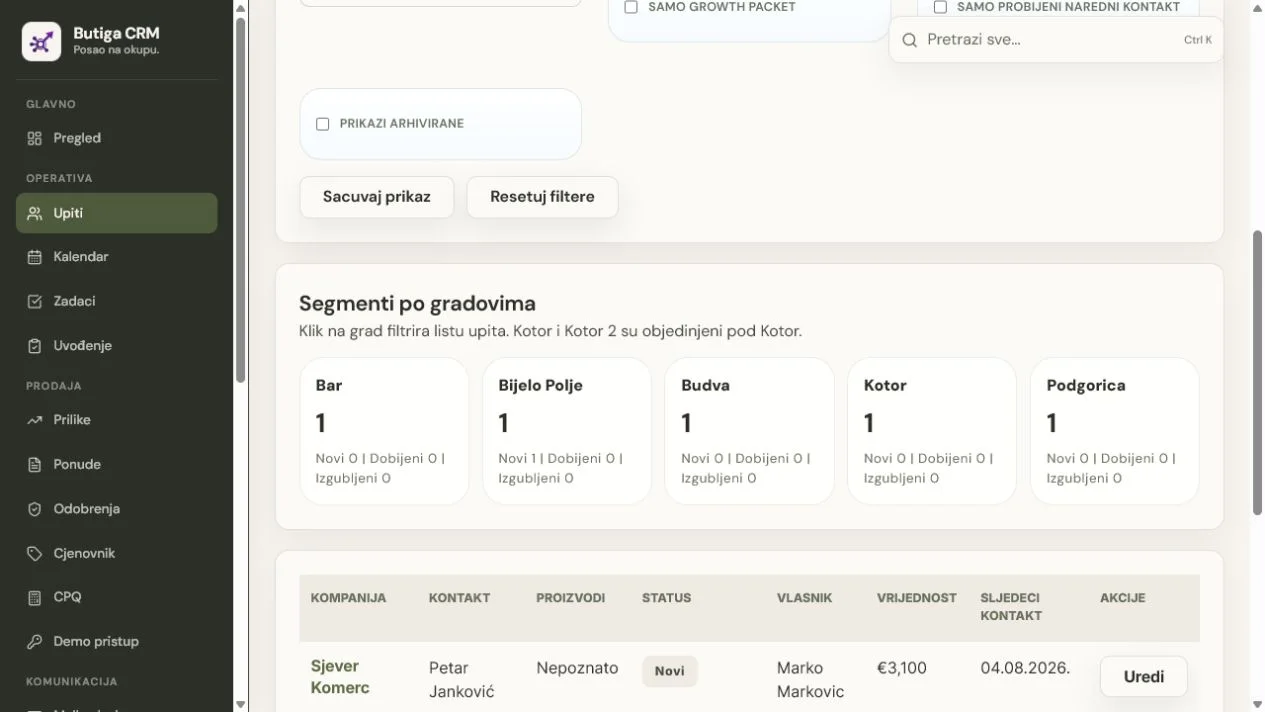
Real lead view in Butiga
The screenshot below shows the actual product interface with demo data. Company names, people and values serve only to demonstrate the workflow.
Illustrative example: from a new enquiry to a qualified lead
- A new enquiry is recorded. The company, main contact and enquiry source are entered.
- Lead gets the owner. The responsible person takes over the next conversation and sets a priority.
- The existing record is checked. Butiga warns of possible company, email or phone matches before a duplicate is created.
- The need and interest are recorded. The team lists the main problem, the relevant product and the data necessary for the qualification.
- The next step is defined. The lead receives a specific activity and next-contact date.
- History stays with the lead. Activities, emails, meetings, tasks, quotes and notes continue in the same record.
Note: The example describes the typical flow in the product and does not represent the result of a real client.
Fewer duplicates, less misplaced context
Two records for the same company often mean two different stories, two owners and two conclusions about what the customer requested. During entry, Butiga can show potential matches based on company name, email or phone. An authorised person can then review and merge the records in a controlled way, rather than deleting data from memory.
What stays with the customer record
- basic company data and contact person;
- the lead's owner, status and priority;
- the source of the inquiry and interest in the product or service;
- the last activity, the next step and the next contact date;
- related e-mails, meetings, tasks and offers;
- Notes, attachments and updated information needed by your process.
Who is this CRM record for?
- Small B2B Teams
that have outgrown one shared spreadsheet and need clear responsibilities. - Sales teams
with more leads, enquiry sources and parallel opportunities. - Service businesses
in which the needs of the client develop through conversations before the final offer. - Agencies and consultants
that need to distinguish the company, main contact and other decision participants.
When an ordinary address book is enough
If you only store a name, phone number and email without tracking an owner, status, quote or next commitment, a standard address book may be enough. Butiga makes sense when a contact needs to be part of a sales process involving several steps and team members.
Start with one real sales case
You do not need a large migration to evaluate it. Take one company with several contacts and check how many places you need to open today to answer four questions: who owns the relationship, what the customer wants, what was last done and when the next contact is due.
Explore all Butiga featuresthen how business email stays with the customer, or book a demo with an example from your process.