

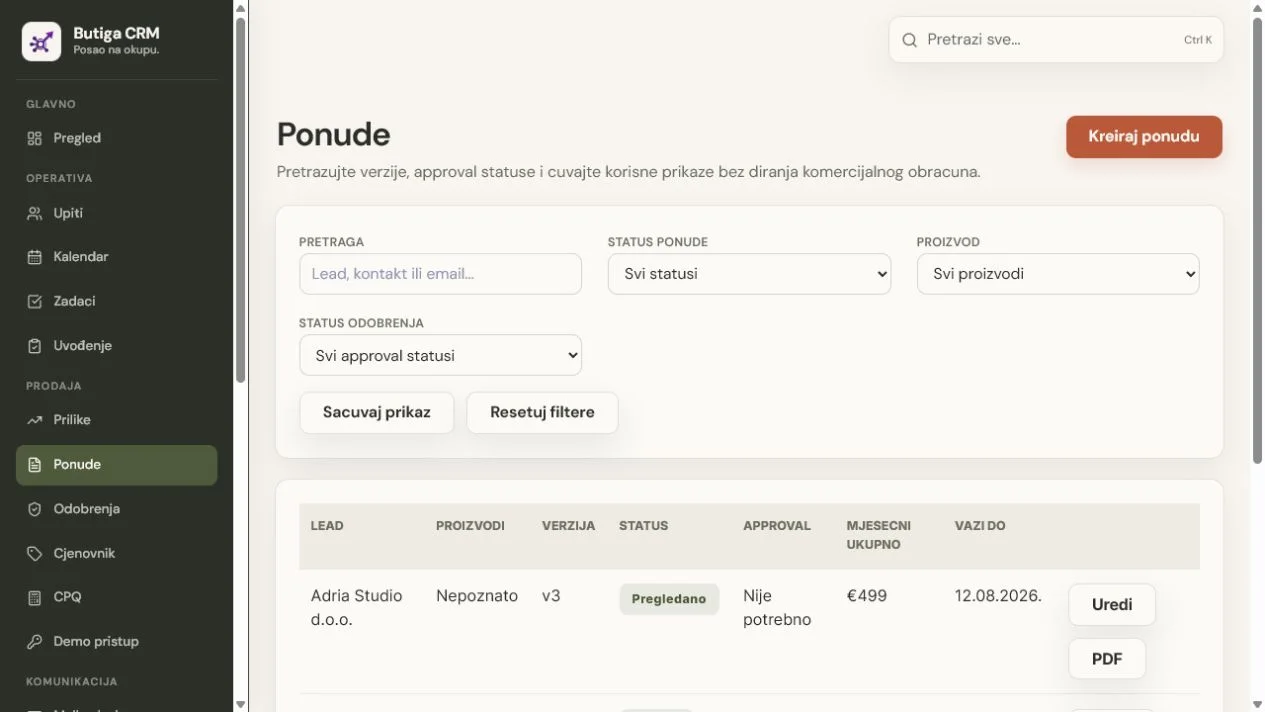
Prepare a sales quote by first confirming the problem and scope, then clearly stating inclusions, price, deadlines, terms and acceptance method. A quote is more than a polished PDF. It records a business agreement that sales, the customer and operations must understand equally. Quote software should retain the valid version, link it to the customer and communication, and show who approved changes. If the team does not know which document is valid, even excellent design cannot remove the business risk.
Confirm five things before writing
- Need. What business problem does the client want to solve, and what does he consider an acceptable outcome?
- Scope. What items, quantities, locations, users or stages of work are offered?
- Responsibility. What does your team do, what does a client provide, and who confirms completion?
- Time. What deadlines depend on accepting, delivering data or other preconditions?
- Decision. Who participates in approval, and what next event leads to acceptance or modification?
Structure of a clear B2B quote
- Short Context
One or two sentences confirming what the client was looking for. - Solution proposed
Specific items and scope, without vague marketing promises. - Price
Units, quantities, discounts, taxes and total value when applicable. - Term and validity
When the quote expires and what the start of delivery depends on. - Conditions and restrictions
What is not included, what assumptions apply and how changes are treated. - Next Step
A clear action for acceptance, questions or alignment.
Process from request to valid offer
- The seller records the confirmed need and opens up an opportunity with the client.
- It shall select items, quantities and approved prices from the price list under control.
- A special discount or derogation shall be sent to the responsible person for approval.
- They send the approved version to the customer and schedule a decision check.
- When a change is needed, they create a new version instead of overwriting the sent document.
- After acceptance, the valid scope and terms move into work handoff.
Example: all the names and data in the display are demonstration.
What should quote software do?
Quote software should reduce version and pricing errors, beyond speeding up PDF export. Look for a connected customer record, controlled price list, discount rules, approvals, version history, quote status and a clear next step. In Butiga, quotes, customers and sales opportunities are linked, so the team sees the context before a change. See details on the page quotes and price list.
Mistakes that make offers unclear
- the title and introduction do not confirm the actual needs of the client;
- items are not precise enough for operations to know what to deliver;
- the discount does not have a visible authorisation;
- the starting date is not related to preconditions;
- multiple files circle without the valid version label;
- the offer was sent without the date of the next verification;
- the accepted document is not linked to the handoff.
Pre-send checklist
Before the client gets the document, the person responsible for the offer should check the content and the sales context. This short check prevents most subsequent explanations:
- the name of the legal person and the contact person correspond to the record of the client;
- the items, quantities, currencies, taxes and total value are harmonised;
- a discount or derogation shall have the necessary internal authorisation;
- the period of validity and preconditions for start-up shall be clearly indicated;
- no outdated paragraph from a previous version remains;
- attachments and links lead to documents the recipient is allowed to see;
- a next action for checking questions or a decision is scheduled in CRM.
How to manage changes without confusion
When a customer requests a change, save a new version instead of overwriting the sent document. Record what changed and why. The previous version remains part of the history, but only one should be the current quote. If price, scope or deadlines change, check whether new approval is required. After sending, record who received the version and the next agreed step. Sales, management and operations can then establish what the customer actually accepted.
A brief example of the introduction and the next step
Introduction: Based on the August 12th talks, the offer includes the introduction of a sales flow for five users, the linking of business emails and the preparation of the starting price list.
Next step: If the scope matches our agreement, please confirm the quote by the stated date. For changes to quantities or deadlines, reply to this message so we can prepare a new version.
Who needs more than this guide
For public procurement, regulated activities, complex contracts and international tax situations the offer may require additional legal, financial or professional verification. This guide does not replace such an assessment.
Connect offer to sales process
Before your next quote, check whether the customer record contains the need, scope, decision owner and next activity date. To see how Butiga connects price lists, versions and sales opportunities, book a demo.